
The idea started with How I Learn.
I read it and kept thinking: I want a system like this, but it has to fit how I already work.
I already have my own system that collects interesting articles from around the web and filters them for me. That solves the first problem; I don’t need to look through everything just to find something worth reading.
The second problem is turning an interesting article into learning that fits into my life.
Sometimes an article deserves more than a quick read. I want to understand the subject, check what other good sources say, and learn it properly.
What normally gets in the way is time. I have family, work, commitments, and life. Maybe getting older is part of it, and I don’t have the same capacity I used to. I’m not sure about that.
What I know is that I don’t have enough time to read every useful article, research the subject, and follow every interesting thread. Things are moving too quickly now.
I already have access to Google’s NotebookLM, so I wondered if I could connect it to the system I already had: pick an article from my filtered feed, ask my agent to research it, then turn it into something I can listen to while commuting.
The design
The first question was whether I could access NotebookLM programmatically.
I couldn’t find an official API for what I wanted to do. I found notebooklm-py through Reddit. It’s an unofficial Python interface to NotebookLM.
I read the code to understand what it was doing. It looked good enough for what I needed, so I decided to connect it to something I already had: my Hermes agent, which I talk to through WhatsApp.
How it works
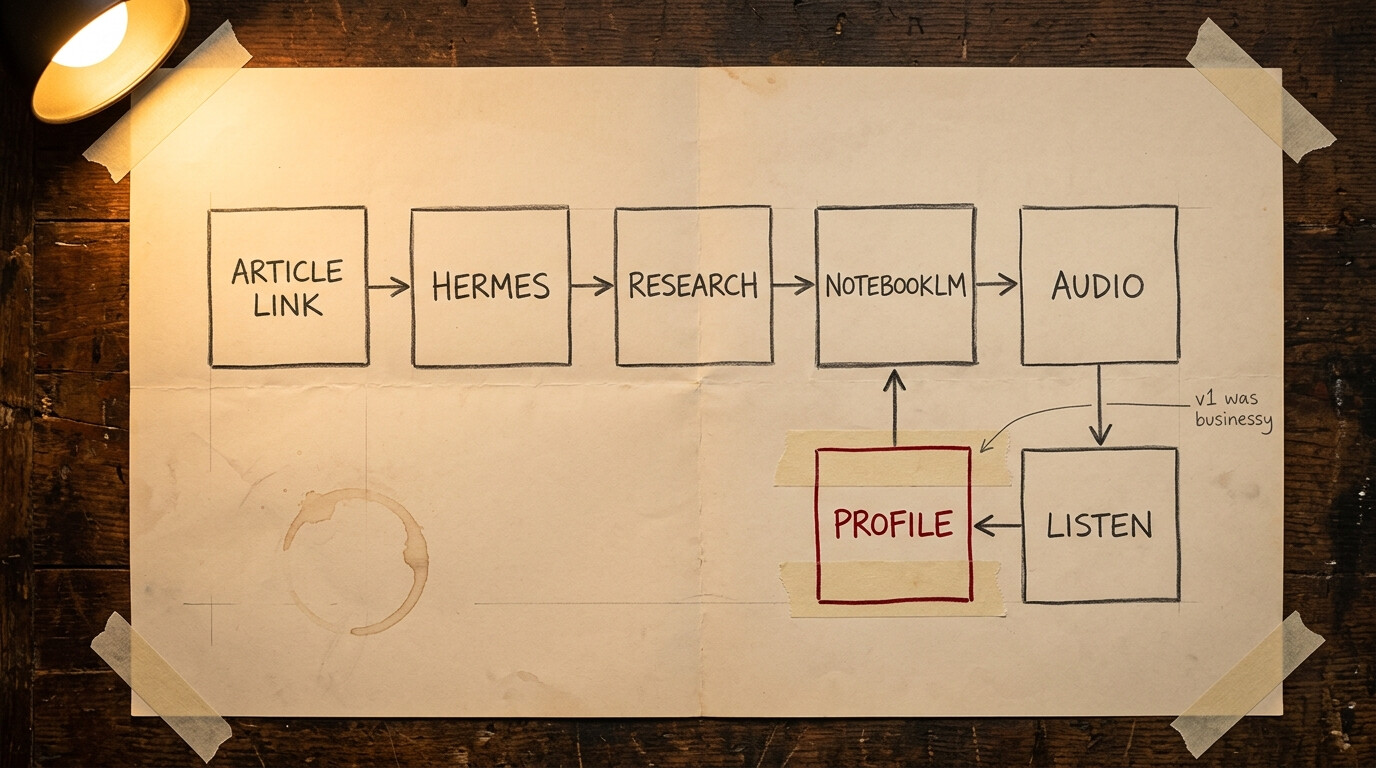
It’s simple to use. I send an article link to Hermes over WhatsApp or Telegram, and the agent does the rest.
It reads the original article first and keeps it as the anchor. It researches the subject, reviews what it finds, and picks the sources that add something tangible or come from a credible authority. The point isn’t to add as many sources as possible; each one needs to help me understand the subject better.
Hermes sends the original article and the selected sources to NotebookLM, which turns them into an audio podcast. Once it’s ready, the audio comes back to me over WhatsApp or Telegram.
I usually listen while driving. That isn’t a requirement; it’s just where this format fits my day.
The first version was too high level
I tested the workflow with one blog post. It worked and the audio was easy to follow, but it was a little too high level and businessy for my taste.
It explained why the ideas mattered, but didn’t spend enough time on how an engineer would apply them. I wanted more on the architecture, tools, tests, trade-offs, failure modes, and the reasoning behind each recommendation.
So I added a technical profile to the generation prompt. It asks NotebookLM to explain mechanisms, architecture, control flow, implementation, verification, and failure recovery for an experienced engineer. It also asks NotebookLM to separate research findings, vendor estimates, author opinion, and inference, and to leave out technical details the sources don’t establish.
One gotcha though: when I ask for more technical detail, the model has more room to sound convincing even when the sources don’t support what it says. That’s why the last part of the profile matters to me.
I don’t want it to read code aloud. I want enough technical substance that I can understand how something works, what could go wrong, and how I would verify it.
The loop is simple: I listen, I notice what is missing, and I change the profile for the next episode.
Also, notebooklm-py is unofficial. It can stop working without warning, and the login needs some maintenance from time to time.
I’m sharing this as an example of something I set up for myself, not as the one way to learn. It works for me, and parts of it may be useful to anyone with the same problem.
I’ve put the Hermes skill, prompts, and supporting references in this GitHub Gist. The files match what I actually use, so you can borrow the process without copying my whole setup.
Hope this helps someone.